Cluster Architecture#
A high-level look at how the LTCI cluster is built and what it can do. Exact per-node specifications (hostnames, core counts, memory) are in the Infrastructure documentation, available to cluster users.
At a glance#
| Compute | 78 nodes · 190 GPUs (NVIDIA P100 to H100) · ~7.8 PFlop/s |
| Scheduler | Slurm with a fairshare policy; free to use, no compute-hour budgets |
| Storage | Shared NFS home · ~180 TB SSD (NVMe) · ~314 TB HDD |
| Network | Ethernet, plus RDMA over Ethernet on the newest nodes · full internet access from compute nodes |
| Users | 600+ researchers across 60+ projects in the LTCI laboratory |
System overview#
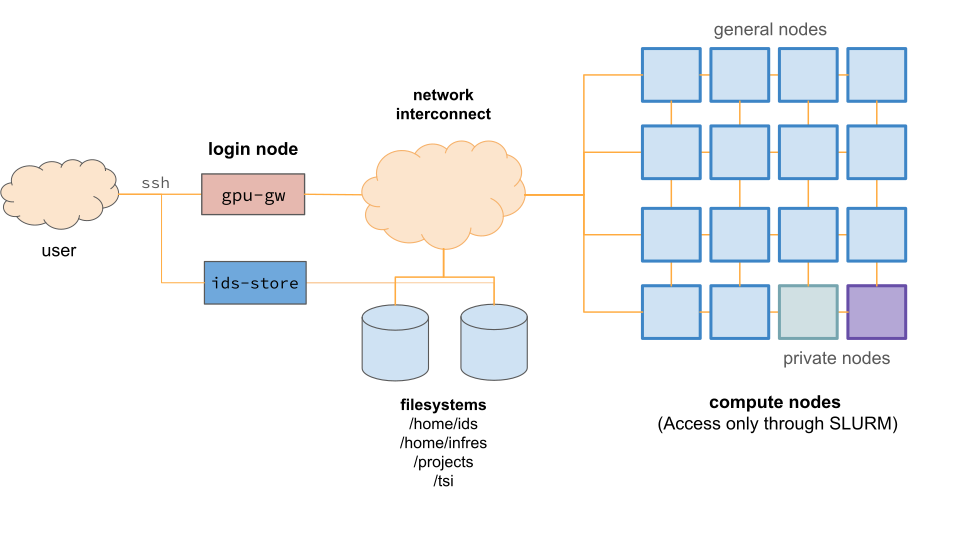
The cluster follows the classic high-performance-computing model:
- Login nodes: where you connect, prepare your code, and submit jobs.
- Compute nodes: where jobs run, grouped into partitions by hardware.
- Shared storage: one filesystem visible from every node.
- A fast network that ties it together and provides internet access.
Compute partitions#
Compute nodes are grouped into partitions by GPU generation. You choose a partition when you submit a job, and the scheduler (Slurm) runs your work on a free machine in it.
| Partition family | GPU generation | Typical use |
|---|---|---|
| H100 | NVIDIA Hopper | Latest-generation and largest training runs |
| L40S | NVIDIA Ada Lovelace | Training and high-throughput inference |
| A100 | NVIDIA Ampere (data-center) | Large-scale training |
| A40 · A30 | NVIDIA Ampere | General-purpose GPU workloads |
| V100 | NVIDIA Volta | General-purpose GPU workloads |
| 3090 | NVIDIA Ampere (workstation) | Development, prototyping, student projects |
| P100 | NVIDIA Pascal | Development and student projects (default partition) |
| CPU | (CPU only) | High-core-count, high-memory CPU workloads |
Several dedicated partitions are reserved for specific research teams and funded projects.
Each compute node pairs several GPUs with multi-core CPUs and a large amount of memory. Generations span NVIDIA Pascal (P100) to Hopper (H100), so the cluster handles both everyday development and demanding, latest-generation work.
Software & environment#
The cluster runs modern machine-learning and scientific workloads out of the box:
- Frameworks: PyTorch, TensorFlow, and JAX, installed in your own environments (
venv,uv, or conda) or pulled as containers. - GPU stack: multiple CUDA toolkit versions and cuDNN, managed through environment modules (Lmod).
- Containers: Apptainer runs any Docker or NVIDIA NGC image with your normal user permissions, so you can bring a fully reproducible stack.
- Interactive work: JupyterHub gives web notebooks directly on cluster GPUs, alongside interactive shells and VS Code Remote-SSH.
See the Software documentation for the full catalogue and guides.
Scaling & network#
- Single-node multi-GPU training is straightforward, since most nodes hold several GPUs.
- Multi-node distributed training is supported. Nodes are connected over Ethernet, and the newest generations (H100, A100, L40S) add RDMA over Ethernet (RoCE) for lower-latency scaling.
- Full internet access from compute nodes, so you can download datasets, pull container images, and reach external services such as Hugging Face Hub and Weights & Biases directly from your jobs.
- The cluster is reachable only from the Télécom Paris network, on campus or over the VPN.
Storage#
All nodes share the same NFS filesystems, so your files appear on every node, login or compute, with nothing to copy.
| Tier | Purpose | Scale |
|---|---|---|
| Home | Personal space | Per-user quota |
| SSD NVMe | Active, shared research projects | ~180 TB |
| HDD storage | Large datasets and long-term archival | ~314 TB |
See the Storage documentation for quotas, backups, and usage policies.